Showing posts with label Browser. Show all posts

Saturday, July 16, 2016

The Easy Way to Invite All Your Friends to Like Facebook Fanspage [1 Clicks]

on this occasion, I will share a tutorial that may be useful for those of you who Have Fanspage his Fans page and want to have a lot of ' like ' from his Facebook Friends.

The way that I share is fairly easy and very easy to understand, it is not hard to ... seriously: v

Okay okay ... Let's start the tutorial ...

First, you download the previewed his Extension on the link below:


Second, After the extension is installed, you open the Facebook fans page and her would you invite your friends to like it.

Third, click "Invite friends to like this page"

Fourth, When the legislation has been a pop up comes up, you click the Checklist that is at the top right corner of your Chrome, and will automatically work

Fifth, wait until the enactment is completed, and Finish

Hopefully, it can help:D Thank you for visiting
Read More

How to Find You and Your Friend Facebook's User ID

This time, I will make a very simple tutorial and certainly useful, surely "The easy way to find out the Facebook ID yourself"

Facebook ID is certainly useful to do something related to someone's Facebook account: v
This is the unique user id on facebook who create the identifier id. as well as the IP address in the domain name. each user has a unique id that is later translated so the username is the same as the current google + where you're just given a user id for direct access to the main page you are ready on the share to everyone without having to make him a friend.

And some of the uses of Facebook ID, as Auto tags on posts or comments with accompanying code ID us.

And here's an easy way to get the ID of our facebook easily: V

1. visit the following Link: http://findmyfbid.com/
2. Enter the URL of your facebook account in the column provided.


3. then click "Find the numeric ID" and your Facebook ID will look:D

Hopefully, it can help: v

Read More

Monday, June 27, 2016

How to Unlock Blocked Site in Chrome


Welcome Friend ..

in time , I 'll give you a Simple tutorial about "Unlock Blocked Site in Chrome"

Oke , Don't waste time ... Follow me Step by Step ,

First , Download Dot VPN In Chrome : CLICK HERE !!!

Second , Click "Added To Chrome" to Install this VPN

Third , After Installation Complete , there will be a "Dot VPN logo" in the right corner of Chrome , 

See the pict :
Fourth , Click this logo , And login with your Email and Password
Fifth ,  Set your VPN country , whatever :v And Will Auto Connecting 
Sixth , Open Your Blocked Site :v And ...... This Open :D

Thanks For Your Visiting ... 
Read More

Saturday, June 25, 2016

Solutions for 'Access Denied' or 'Network Failed' When Installing Chrome Extensions


Good night. ..


Have you ever experienced the "access denied" or "Network Failed" when want to install extensions in Chrome? or are you currently experiencing it?


Well, I've prepared a way that will help you in doing so.


Follow the the following step by step  :


1. Locate the extension will be installed, for example: I am going to install AdBlock Plus,
2. copy the URL of the extension

3. then go to the following link: Click Here !!!
4. After that open the link, then Paste the URL you copied extensions
5. press "Download Extensions"
6. once the Download is complete, go to the settings on the Chrome and select extension

7. open the Extensions folder that you downloaded earlier, then drag it to the Chrome extensions

8. And, the extension has been  installed:D

Okay, so it's from me this time, hopefully can help you:D
Read More

Wednesday, June 22, 2016

How to Remove Annoying Ads on Mozilla Firefox

This time I will share about how to Eliminate disturbing ads in the Mozilla Firefox Browser

At the time of opening a paid hosting or free hosting or when opening a browser, you've probably experienced the emergence of ad on sidebar top, bottom, left, or right of the screen of your PC or laptop, usually this picture in the form of GIF images or flash which is certainly very annoying. How do these ads could appear and what the cause we will discuss in this tutorial.

Without we realize when we download the file to the computer especially software that's when some additional scripts that intentionally inserted into a downloader. The script of an ad that's what indirectly participate installed as we install main software or files. This script works on your online time by automatically will bring up a picture of the ad at the time you open your browser, blogspot hosting, wordpress hosting that points to a specific site.

I will explain how to remove those ads that always bother you at the time of Browsingan or any other thing on Mozilla Firefox.

1. Visit the site > > >Here < < <
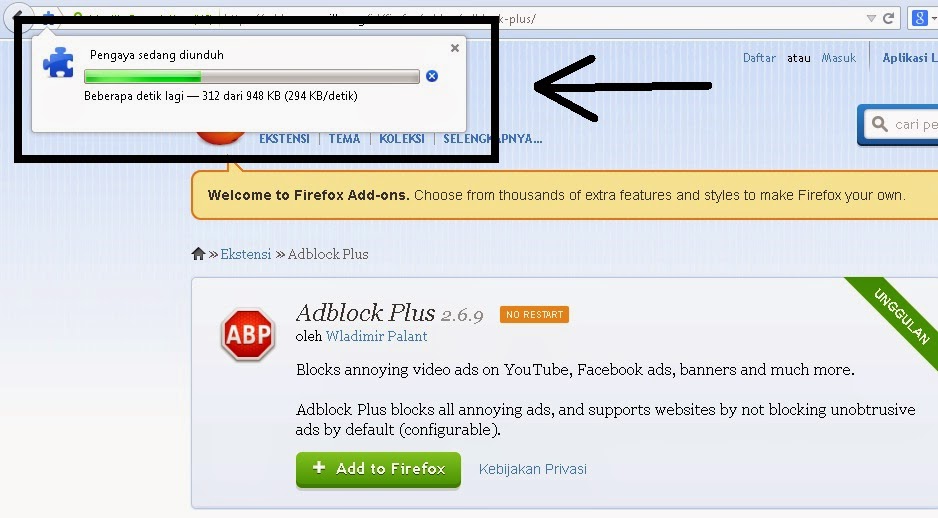
then click the + Add To Firefox


2. After that, it will appear As the picture below, just You Wait until it is finished, it won't be long. ..


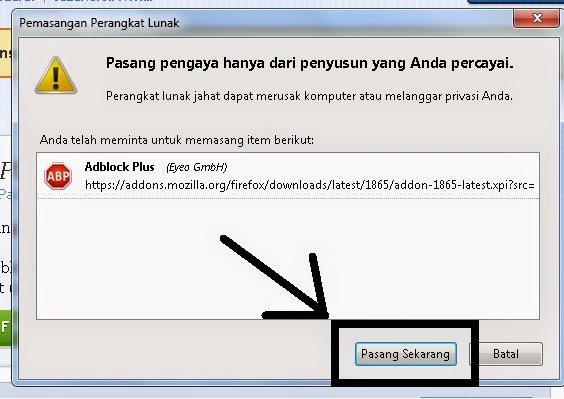
3. then, the display will appear like this, you just click Install Now


4. In addition to Block Ads, the Software is also useful beyond that, for more details, you can see the image below, click and press ''Pasang Sekarang' in english it mean 'Install Now'

Thats the tutorial how to remove the ads Always Menggagu in Mozilla Firefox from me. ..
Please leave a comment if you not understand ^^ ... Thank You

Read More